
Suppliers (SY) Registry
Apply for Suppliers Registry to supply construction related materials for public sector construction project in Singapore. Learn eligibility criteria, application types, and required documentation.
Last updated 12 March 2026
What is the Suppliers Registry?
The Suppliers Registry is a registry of firms eligible to tender for public sector supply contracts for construction related materials or equipment. This registry ensures that all registered suppliers meet the baseline registration requirements, before they can participate in public sector construction supply tenders.
Who should apply?
Suppliers intending to tender for public sector supply contracts of construction-related materials or equipment.
Understanding how the Suppliers Registry works
The supplier registry consists of various workheads covering a diverse range of materials that are typically supplied for public sector construction projects. The relevant Specific Registration Requirements (SRR) are linked in the table below. Firms may choose to apply for the workhead(s) relevant to the material(s) they supply.
Information on Specific Registration Requirements (SRR)
Registration Category | Financial Grades |
|---|---|
L6, L5, L4, L3, L2, L1 |
Understanding the types of applications
Firms may choose to make any of the following types of application:
Registration of new Workhead(s)
Registration of additional Workhead(s)
Upgrading of Workhead(s)
Renewal of Workhead(s)
Understanding the application process
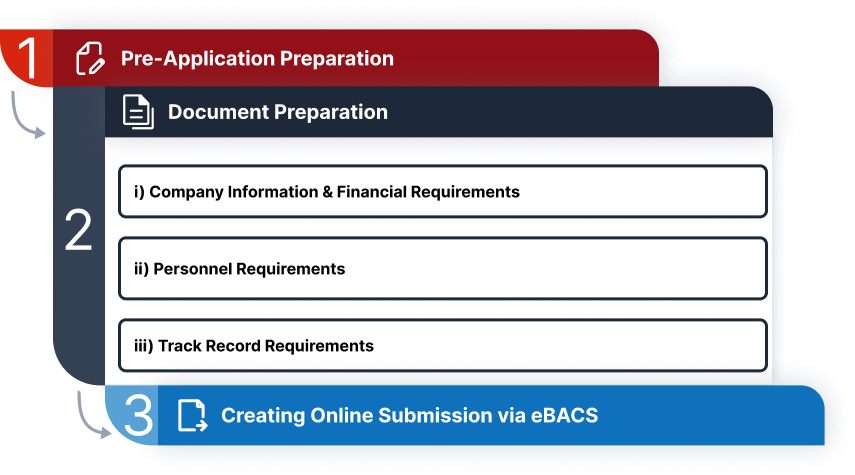
Step 1. Pre-application preparation
Before applying, review the Suppliers Registry Guidelines, Terms of Registration and the Specific Registration Requirements (SRR) for your chosen workhead.
Step 2. Document preparation
1. Company information & financial requirements:
Prepare these essential documents:
Recent ACRA BizFile (not more than one month old)
Latest management mccounts (P&L and Balance Sheet) signed by Director for L1-L4 registrations
or latest audited accounts for L5 and L6 registrations
2. Personnel requirements
Use the personnel eligibility checker to verify your staff qualifications meet the requirements.
Prepare these essential documents:NRIC/S Pass/Employment Pass for all relevant personnel
Latest CPF Form 90 for local/PR employees
Recent SGWorkpass profile screenshot showing employer and work pass expiry date for foreign personnel
Relevant education certificates in English (official translation required if not in English)
Required licences as specified in the SRR
3. Track record requirements
Prepare these essential documents for each track record:
Award Letters, Purchase Orders, or Invoices for your three largest projects
Step 3: Creating online submission via eBACS
Access BCA’s Electronic Builders Licensing and Companies Registration Systems (eBACS) portal.
Refer to eBACS guide [PDF, 1.28 MB] for step-by-step guide on how to use the eBACS portal.
Updating firms’ information and particulars
Registered firms can update their firm’s particulars during their registration validity period through the below platforms:
Platforms to update firm’s particulars
Type of Information | How to update |
|---|---|
Company Information (e.g. address, contact details) | Login to BCA eBACS portal (https://www.bca.gov.sg/eBACS/ ) and navigate to Company Information page. |
Track Record | Log in to BCA eBACS portal (https://www.bca.gov.sg/eBACS/). Hover your mouse over "My Application" on the top menu and select “Update Track Records Request”. |
Technical personnel | Submit your request via https://go.gov.sg/bcapersonnelupdate to:
Singpass login by the technical personnel is required. |
To resign one or more personnel from your company’s personnel records, submit your request via https://go.gov.sg/crs-bls-update-director-and-resigned-personnel. |
Additional resources
Tendering Limits: View SY tendering limits to understand project values eligible for your grade.
Frequently Asked Questions on Contractors Registration System (CRS) [PDF, 220 KB]