
Supporting information on new and existing licences
Ensure your outdoor advertising sign meets BCA and URA regulations, including height, size, location, and permit requirements, before applying for a licence.
Last updated 26 January 2026
Ensure your sign meets regulatory guidelines
Before submitting your application, use this online consultation to check that your proposed advertising sign or signboard meets all relevant guidelines.
There are three sets of URA’s outdoor signage guidelines, applicable based on the sign location. To find out which URA guidelines your proposed advertising sign/signboard needs to comply with, please visit the URA Map to determine the location:
Building Control (Outdoor Advertising) Regulations
Projection and height requirements for signs installed over footpaths, verandah-ways, streets, and drains, with sample guidelines.
Scenario | Requirements | Sample |
|---|---|---|
Sign fixed in a verandah-way or over a footpath | Shall not be less than 2.5 metres above the level of the verandah-way or footpath | Signage projection [PDF, 43 KB] sample 1 |
Sign projecting over any street above the cover of any roadside drain | Shall not be erected less than 2.5 metres above the cover of the roadside drain | Signage projection [PDF, 43 KB] sample 2 |
Sign projecting from the building line more than 3.75 metres but less than 5 metres above street | Shall not project more than 60 centimetres from the regular line of the street | Signage projection [PDF, 43 KB] sample 3 |
Sign projecting from the building line 5 metres or more above street | Shall not project more than 1.5 metres from the regular line of the street | Signage projection [PDF, 43 KB] sample 4 |
Read the Building Control (Outdoor Advertising) Regulations for more details.
Building Control (Temporary Building) Regulations 2018
You must obtain a Permit To Use for your advertising sign or signboard before a sign licence can be granted. This applies if your sign or advertising structure meets either of the following criteria:
The advertising sign/signboard exceeds 10m² in area and is supported by an advertising structure.
The advertising structure exceeds 10m² in area, or the highest point of the structure (frame, panel, hoarding, object, support, etc.) is 4 metres or more above the surface it stands on.
For the submission of Permit To Use, the Professional Engineer has to apply through the CORENET e-Submission System.
The validity period of the Permit To Use has to cover the entire duration of the sign display period.
An example of the sign display period:
Sign display period | Permit To Use validity period | Remarks |
|---|---|---|
1 January 2024 to 30 June 2024 | 1 January 2024 to 25 June 2024 | Permit To Use will be rejected during licence application |
1 January 2024 to 30 June 2024 | 1 January 2024 to 30 June 2024 | Permit To Use will be accepted during licence application |
Other guidelines and requirements
Guidelines and requirements | Details |
|---|---|
Guidelines on signs at bus shelters | |
Guidelines for display of banner | The top edge of the banner must not be higher than 30 metres from the ground level. The area of the banner should not exceed 50% of the surface area of the building facade, as measured up to 30 metres from the ground level. A maximum of 3 banners can be displayed on the building facade at any given time. For banners put up for a National Event, the brand name of the sponsor must not take up more than 15% of the banner area to enjoy a waiver of licence. |
Guidelines on display of vertical banners on public street lamp posts | |
Requirements for signs on lampposts and banner poles along Orchard Road |
Note: BCA may disclose your application form to relevant government agencies and non-government entities if consultation with the other relevant agencies is required for applications for the display of outdoor signage within the Central Area, on road related facilities and structures, or grass verge, etc. |
Read the Building Control (Temporary Building) Regulations 2018 for more details.
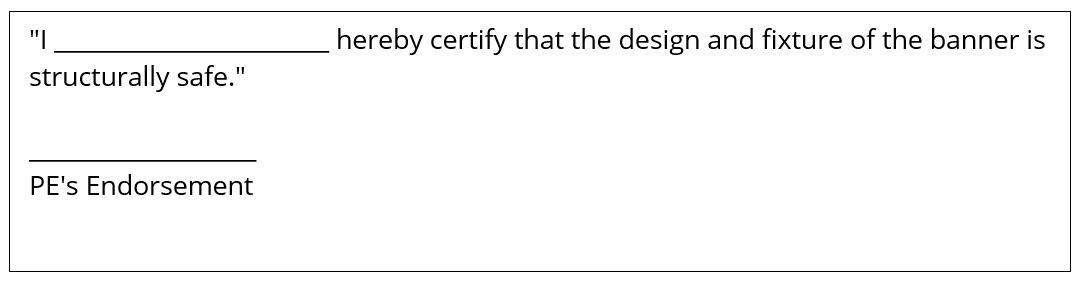
Professional Engineer’s certification for banners
You need Professional Engineer's (PE) certification if your banner falls under one of the following categories:
Banners exceeding 10m2 and are displayed with bars or rods
Banners exceeding 30m2
The following PE's certification (to be duly endorsed and shown on the structural drawings), is required:
Calculate your licence fee
Use this fee calculator to estimate your licence fee.
Annual licence fees for various sign types, including signboards, advertisements, directional signs, animated billboards, skysigns, and balloon signs.
Type of licence | Basis of chargeable fee | Rate per year |
|---|---|---|
Signboard licence* | Up to 15m2 | $50 per licence |
Above 15m2 | $20 per m2 or part thereof in excess of 5m2 | |
Advertisement licence / Directional Sign licence / Free Standing Signboard licence | Up to 1m2** | $20 per sign |
Above 1m2 to 5m2 | $90 per sign | |
Above 5m2 to 10m2 | $140 per sign | |
Above 10m2 | $20 per m2 or part thereof per sign | |
Animated Billboard licence | Up to 10m2 | $225 per sign |
Above 10m2 | $30 per m2 or part thereof per sign | |
Skysign licence Balloon Sign licence | Display Area | $40 per m2 or part thereof per sign |
*Each business premise is eligible for a one-time aggregate 5m2 signboard exemption. Exemption may be considered upon submission of the declaration form [PDF, 130 KB] during the online consultation via Advertisement licensing System (ALS). **All advertisements / directional signs / banners up to 1m2 are classified as small advertisements. | ||
The minimum chargeable period of the licence is one month, subject to a minimum fee of $20.00.
If the licence period is more than a month, this duration will be pro-rated to the next one month. For example, 5 May to 4 June is considered as one month, while 5 May to 5 June is taken as two months.
Permit To Use fee
PTU fees for temporary buildings based on statistical gross floor area or per-structure charges where floor area cannot be measured.
Type | Fee |
|---|---|
Temporary Building with statistical gross floor area | $200 for every 100m2 |
Temporary Building with no measurable statistical gross floor area | $200 per structure |
How to make payment
Giro payment is compulsory for annual auto-renewal of licences. If the licence is not automatically renewed the following year, a fresh application needs to be made to obtain a new sign licence.
e-Nets and credit card
Pay online through ALS
PayNow
Please use BCA PayNow proxy T08GB0005B101 or simply scan the QR Code below:

Indicate Licence Number or Formal Application Number in PayNow reference field.
Note: Payment will only be accepted for new application or licence with renewal/payment notice issued. Licence will not be renewed if renewal/payment notice is not issued.
Internet Bank Transfer
Transfer to BCA Bank Account as below –
Account Name: Building and Construction Authority
Account Type: DBS Current Account
Bank Code: 7171
Account Number: <001-021871-9>
DBS Swift Code: DBSSSGSG
Once payment is made successfully, submit the payment details through BCA’s Payment Notification via https://go.gov.sg/bcapmt.
Note: Payment will only be accepted for new application or licence with renewal/payment notice issued. Licence will not be renewed if renewal/payment notice is not issued.
Giro
With effect from 1 April 2025, to renew a licence, applicant to submit:
eGIRO of participating banks through BCA eGIRO portal;
hardcopy of BCA GIRO Application Form of non-participating eGIRO banks.
Fill this form to indicate your selection.
How to change the licence ownership
The ownership of an outdoor advertising sign/signboard licence is not transferable. It is mandatory to submit a new consultation with the required documents and drawings via Advertisement Licensing System (ALS) to obtain a new licence.
How to renew licence
Renewal requirements and procedures for advertisement licences, including manual renewal steps, documentation, and upcoming GIRO-based auto-renewal process.
Renewal duration | Details |
|---|---|
Less than a year | Submit the renewal request via the Advertisement Licensing System (ALS) with the following documents:
|
Auto-renewal of licences annually | Giro payment is compulsory. With effect from 1 April 2025, to renew a licence, applicant to submit
Fill this form to indicate your selection. Deduction takes place in the next renewal period after bank's approval. |
How to cancel licence
Log in to the Advertisement Licensing System (ALS) via Singpass to submit the licence cancellation. Click on “Cancellation Request” and fill in the required details. (Note: Licensee UEN/NRIC/FIN filled in for cancellation request shall be the same as the UEN/NRIC/FIN submitted during licence application.)
How to update particulars
Inform BCA of the updated particulars of the licensee and the licence number via our feedback form. The feedback form shall be submitted by:
The licensee; or
A representative can send in the request, with the licensee’s authorisation letter.
How to retrieve your past licence records or drawings
Login Advertisement Licensing System (ALS) via Singpass to submit the search and copy request for the licence copy or drawings via the online system.
There is a chargeable fee of $20^ for each search. Some drawings/ information may not be available in our database. The search fee is not refundable, even if the search is not successful. Only the licensee or the authorised representative can make the request to BCA to search for the licence/ drawings.
To retrieve the search result, there is a chargeable fee of $5^ and $25^ for each licence copy and each set of drawings respectively.
Cheque payment is not accepted for search and copy payment.
^Inclusive of 9% GST.